Congratulations on the purchase of your **OmniCAN Gateway**. This precision-engineered module is designed to bridge the gap between your Haltech ECU and your mobile device, providing real-time control and monitoring at the highest level of reliability.
---
## 1. HARDWARE INSTALLATION
The OmniCAN Gateway is housed in a automtive grade SLS Nylon enclosuyre. While durable, it is designed for a specific operating environment.
> [!CAUTION]
> # CAUTION #
> **INTERIOR USE ONLY:** The OmniCAN housing is **NOT** **Waterproof** or **IP-rated**.
> - **MOUNTING:** Install the module inside the vehicle cabin (dashboard, center console, etc.).
> - **ENVIRONMENT:** Keep away from moisture, direct water spray, and excessive heat sources.
> - **HEAT:** Safe for ambient cabin temperatures up to **80°C (176°F)**.
---
## 2. WIRING & PINOUT
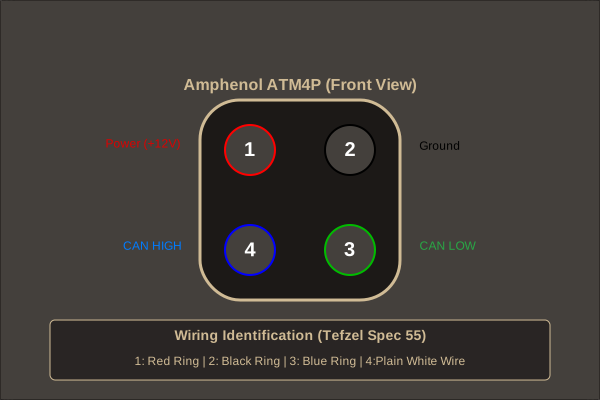
Your kit includes a professional-grade pigtail harness constructed from **Tefzel Spec 55 (M22759/32)** wire — the gold standard for motorsport wiring.
### Amphenol ATM4P Connector (Front View)
| PIN | FUNCTION | WIRE COLOR | DESCRIPTION |
|:---:|:---|:---|:---|
| **1** | **POWER** | ● White Wire / Red Ring | Switched +12V DC (Ignition) |
| **2** | **GROUND** | ● White Wire / Black Ring | Chassis or ECU Signal Ground |
| **3** | **CAN HIGH** | ● White Wire / Blue Ring | CAN_H (High Speed Bus) |
| **4** | **CAN LOW** | ● White Wire / Green Ring | CAN_L (High Speed Bus) |
---
## 3. CAN BUS REQUIREMENTS
### Speed & Termination
Precision communication requires proper network health.
- **TERMINATION:** The OmniCAN Gateway, out of the box, is a **Non-Terminated** node.
- A CAN bus requires two **120Ω** termination resistor present. One at the start of the bus and one at the end.
- The Haltech ECU has an in built termination resistor taking care of the start.
- If there is not already an end termination resistor present the OmniCAN gateway can be configured to enable it's onboard resistor.
- To enable the onboard resistor turning the Omnican Gateway into a **Terminated** node, remove the 2 screws beside the ATM/DTM connector and the 5 screws on the bottom of the enclosure. This will allow you to remove the PCB from the enclosure.
- Located beside the ATM/DTM connector is a 3 pin header with a yellow two pin jumper. Move this jumper from the **NC**(No Connection) position to the **120Ω** position. The positions are marked on the PCB. Reassemble the enclosure and the **120Ω** **Termination Resistor** will be enabled.
> [!CAUTION]
> # CAUTION #
> ### It is critical that exactly two 120Ω termination resistor as present, one at each end of the bus. ###
---
## 4. NEXT STEPS
1. **POWER UP:** Turn on your ignition and verify the gateway's power LED is active.
2. **ECU SYNC:** Follow the **[ECU Configuration Guide](/docs/ecu_configuration)** to enable the device in your Haltech software.
3. **APP LINK:** Download the OmniCAN app and follow the **[Android App Guide](/docs/android_app_guide)** to pair via Bluetooth.
---