
OMNICAN GATEWAY
// OWNER'S MANUAL: QUICK START & WIRING
Congratulations on the purchase of your OmniCAN Gateway. This precision-engineered module is designed to bridge the gap between your Haltech ECU and your mobile device, providing real-time control and monitoring at the highest level of reliability.
1. HARDWARE INSTALLATION
The OmniCAN Gateway is housed in a automtive grade SLS Nylon enclosuyre. While durable, it is designed for a specific operating environment.
CAUTION
INTERIOR USE ONLY: The OmniCAN housing is NOT Waterproof or IP-rated.
- ■MOUNTING: Install the module inside the vehicle cabin (dashboard, center console, etc.).
- ■ENVIRONMENT: Keep away from moisture, direct water spray, and excessive heat sources.
- ■HEAT: Safe for ambient cabin temperatures up to 80°C (176°F).
2. WIRING & PINOUT
Your kit includes a professional-grade pigtail harness constructed from Tefzel Spec 55 (M22759/32) wire — the gold standard for motorsport wiring.
Amphenol ATM4P Connector (Front View)
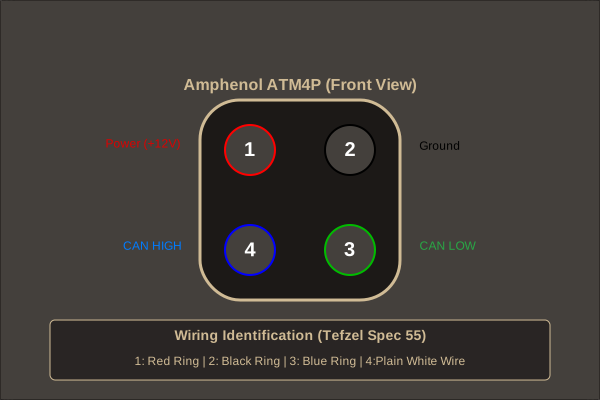
| PIN | FUNCTION | WIRE COLOR | DESCRIPTION |
|---|---|---|---|
| 1 | POWER | ● White Wire / Red Ring | Switched +12V DC (Ignition) |
| 2 | GROUND | ● White Wire / Black Ring | Chassis or ECU Signal Ground |
| 3 | CAN HIGH | ● White Wire / Blue Ring | CAN_H (High Speed Bus) |
| 4 | CAN LOW | ● White Wire / Green Ring | CAN_L (High Speed Bus) |
3. CAN BUS REQUIREMENTS
Speed & Termination
Precision communication requires proper network health.
- ■TERMINATION: The OmniCAN Gateway, out of the box, is a Non-Terminated node.
- ■A CAN bus requires two 120Ω termination resistor present. One at the start of the bus and one at the end.
- ■The Haltech ECU has an in built termination resistor taking care of the start.
- ■If there is not already an end termination resistor present the OmniCAN gateway can be configured to enable it's onboard resistor.
- ■To enable the onboard resistor turning the Omnican Gateway into a Terminated node, remove the 2 screws beside the ATM/DTM connector and the 5 screws on the bottom of the enclosure. This will allow you to remove the PCB from the enclosure.
- ■Located beside the ATM/DTM connector is a 3 pin header with a yellow two pin jumper. Move this jumper from the NC(No Connection) position to the 120Ω position. The positions are marked on the PCB. Reassemble the enclosure and the 120Ω Termination Resistor will be enabled.
CAUTION
It is critical that exactly two 120Ω termination resistor as present, one at each end of the bus.
4. NEXT STEPS
- ■POWER UP: Turn on your ignition and verify the gateway's power LED is active.
- ■ECU SYNC: Follow the ECU Configuration Guide to enable the device in your Haltech software.
- ■APP LINK: Download the OmniCAN app and follow the Android App Guide to pair via Bluetooth.
© 2026 BOWER MOTORSPORT | PRECISION ENGINEERING